Every server. Every cloud.
One place.
A unified control plane for AWS, GCP, Azure, and DigitalOcean. Manage, monitor, and secure your entire fleet without giving us your cloud credentials, ever.
Purpose-built for multi-cloud reality
Most platforms manage one cloud. CloudAIPilot manages four, natively, without workarounds. And we brought two capabilities no other cloud management platform has.
All four clouds, natively
AWS, GCP, Azure, and DigitalOcean: provisioned, managed, and monitored under one roof. No third-party adapters, no credential proxies. Each provider uses its own secure auth method: STS AssumeRole for AWS, Service Account JSON for GCP, ARM SDK for Azure, and API tokens for DigitalOcean.
Post-Quantum Cryptography
One-click activation for quantum-safe SSH. Your connections are secured with PQC encryption (ML-KEM-768 key exchange + ML-DSA-65 signatures) with a classical fallback for compatibility. No other cloud management platform offers this: we ship it as a standard feature, not an enterprise add-on.
AI Deep Scan
Click one button. AI Pilot reads your CPU, RAM, disk, running processes, security posture, SSL certificates, and all services on a server, then returns a structured health report with specific, actionable recommendations. Not generic alerts. Infrastructure-specific analysis grounded in what's actually running.
Your entire fleet.
One dashboard.
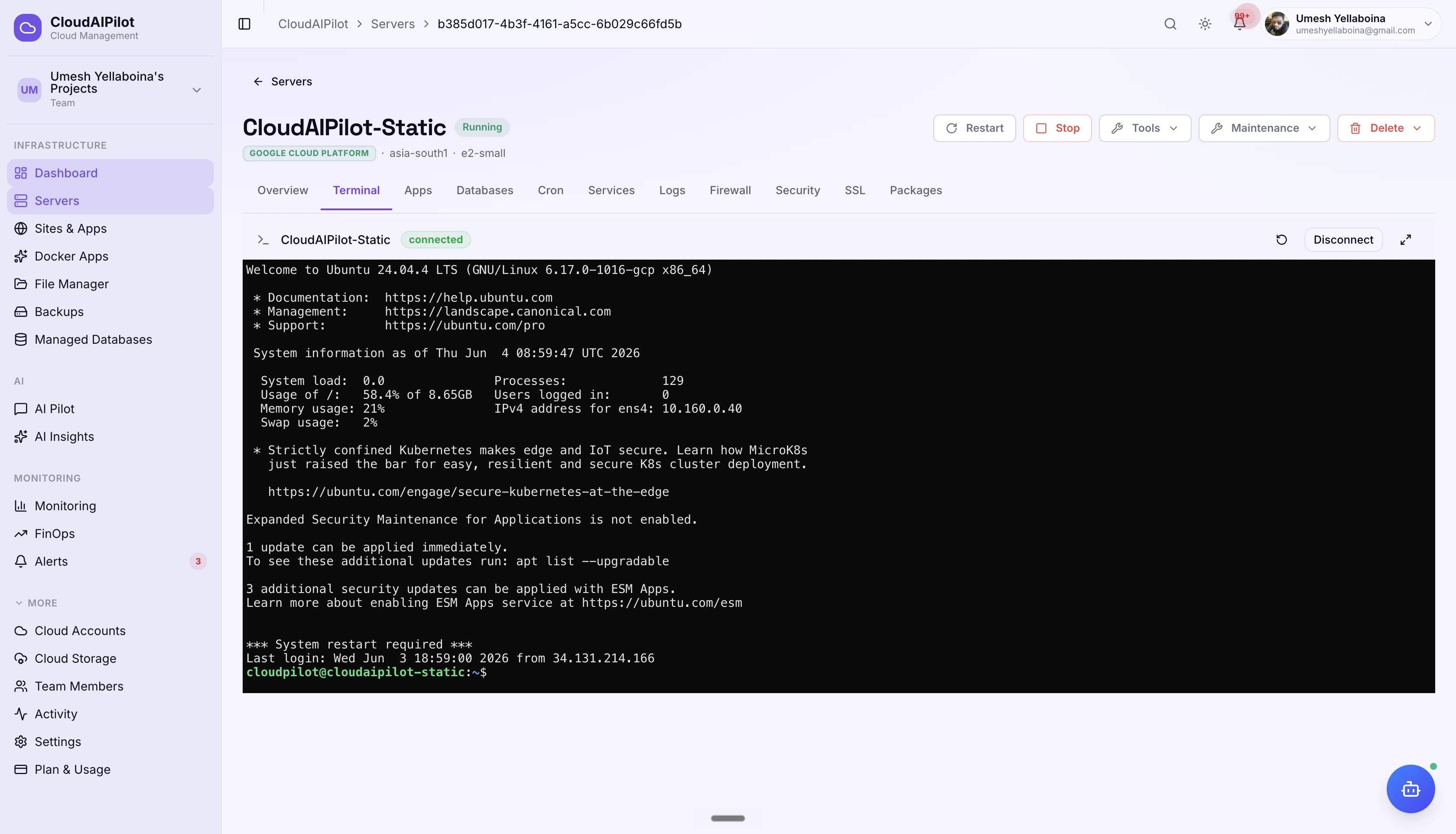
See every server across every cloud account you've connected: sorted, filtered, and live. Agent heartbeat tells you each server's health at a glance, without polling or SSH probes.
Live agent heartbeat
Each managed server runs a lightweight agent that reports health, metrics, and connectivity status in real time, no manual refresh.
Provider and region labels
Every server card shows the cloud provider, region, OS, and any deployed stacks, so you know exactly what you're looking at without opening a detail view.
One-click SSH, from anywhere
Open a full browser terminal to any server directly from the list. No client software, no key management hassle, just click and type.
Intelligent SSH repair
If SSH breaks, CloudAIPilot detects the cause (network rule, key mismatch, agent down) and offers provider-specific repair steps, no generic "check your firewall" advice.
12 tabs. Every dimension of a server.
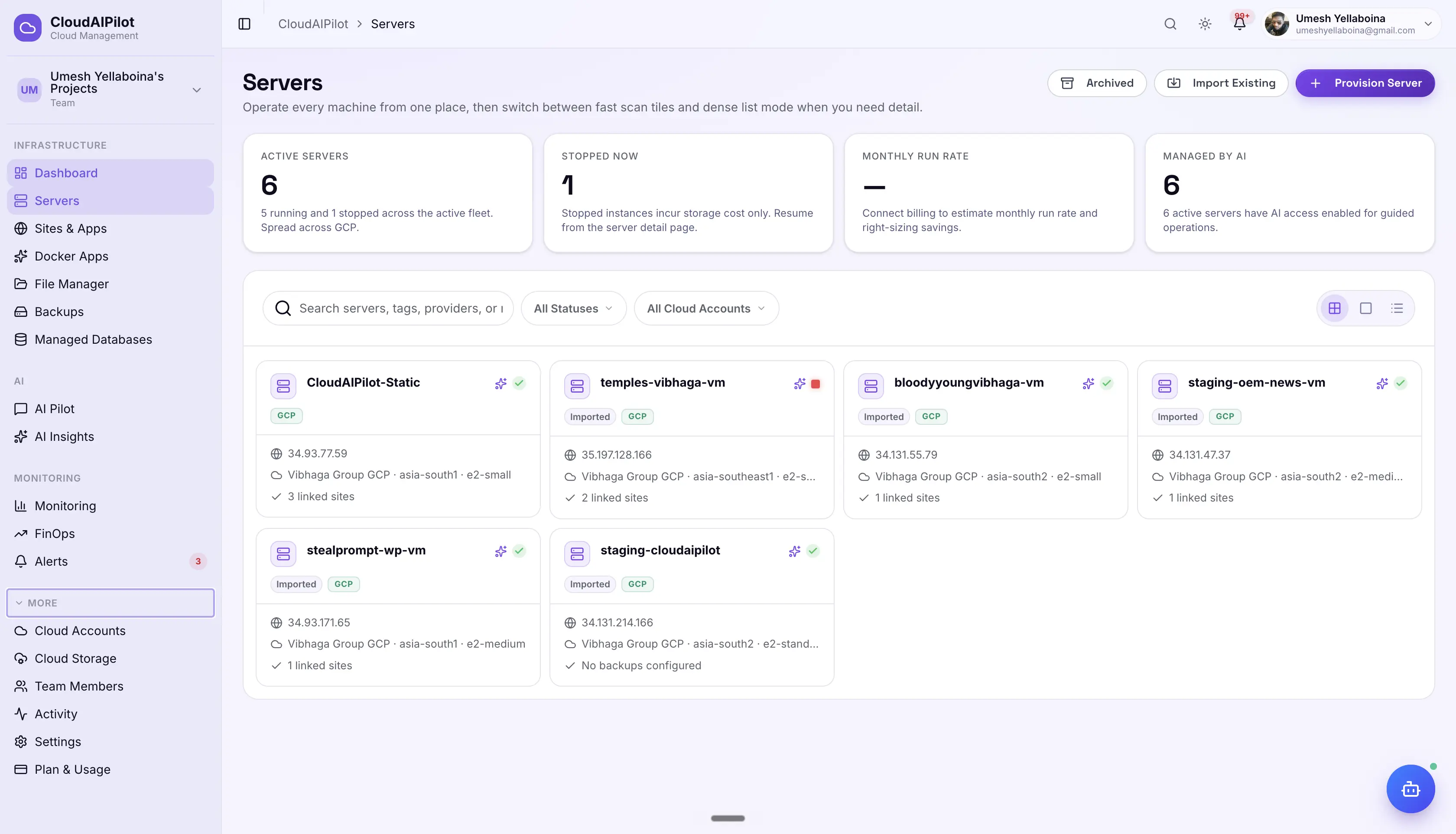
The server detail page is a complete operating room for a single machine. Each tab is a fully-featured module, not a simplified wrapper.
Overview
Real-time CPU, RAM, disk, and network stats. Agent heartbeat, uptime, OS version, IP addresses, assigned stacks, and a one-click AI Deep Scan button. The control room for a single server.
Terminal
Full xterm.js SSH session in the browser. 5,000-line scrollback, full colour output, file transfer, and session persistence. Intelligent SSH repair diagnoses broken connections, provider-specific, not generic.
Firewall
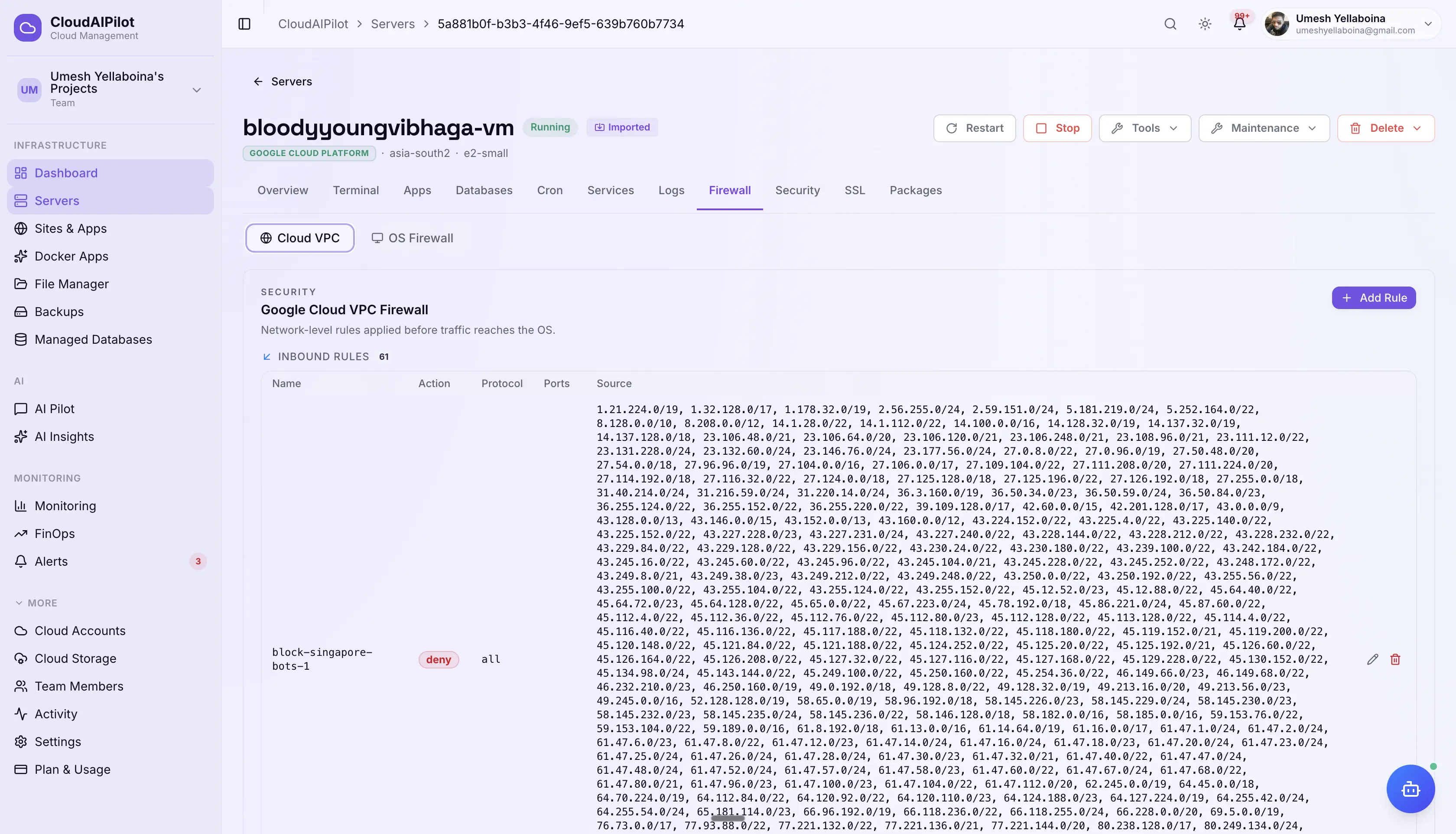
Two firewall layers in a single tab: cloud VPC rules (AWS Security Groups, GCP Firewall Rules, Azure NSG, DO Firewall) and OS-level UFW rules, side by side. Built-in rule templates for common setups.
Services
Full systemd service management: list all running and stopped services, view live logs, and start / stop / restart with confirmation prompts. Keeps a history of every state change.
Security (PQC)
Configure and monitor post-quantum cryptographic settings for this server. Enable ML-KEM-768 key exchange and ML-DSA-65 signatures, check agent status, and toggle classical fallback, all with one click.
SSL Certificates
View all SSL certificates installed on this server: domain, issuer, expiry date, days remaining, and renewal status. Visual expiry badges alert you before certificates expire. One-click Let's Encrypt renewal.
A full terminal.
In any browser.
No SSH client. No key file juggling. Open a full terminal session to any managed server directly from your browser, on any device, from anywhere.
Full xterm.js emulation
Complete ANSI colour support, 5,000-line scrollback, resize handling, and Ctrl shortcuts. Behaves exactly like a native terminal.
Intelligent SSH repair
When SSH breaks, the platform detects the exact cause: a blocked port, mismatched key, or a stopped agent, and gives you provider-specific steps to fix it, not a generic checklist.
Session persistence
Browser refreshes don't kill your session. Reconnect to a running tmux or screen session seamlessly, long-running jobs stay running.
Audit trail every keystroke
Every terminal session is logged in Activity Center: who connected, when, and a full command history. Required for compliance, invaluable for incidents.
Live xterm.js session, rendered in any browser, no client required
Two layers of protection.
One tab.
Most tools expose only one firewall layer. CloudAIPilot shows your cloud VPC rules and OS-level UFW rules side by side, so you can see the full picture and manage both without switching screens.
Cloud VPC Rules
AWS Security Group| Direction | Protocol | Source / Dest | Port | Action | Note |
|---|---|---|---|---|---|
| INBOUND | TCP | 0.0.0.0/0 | 443 | ALLOW | HTTPS |
| INBOUND | TCP | 0.0.0.0/0 | 80 | ALLOW | HTTP redirect |
| INBOUND | TCP | 10.0.1.5/32 | 22 | ALLOW | SSH restricted |
| INBOUND | ICMP | 10.0.0.0/16 | N/A | ALLOW | VPC ping |
| INBOUND | TCP | 0.0.0.0/0 | 3306 | DENY | MySQL blocked |
| OUTBOUND | All | 0.0.0.0/0 | All | ALLOW | Default egress |
OS-Level Firewall
UFW · Active| To | Action | From | Comment |
|---|---|---|---|
| 22/tcp | ALLOW | Anywhere | SSH access |
| 80/tcp | ALLOW | Anywhere | HTTP |
| 443/tcp | ALLOW | Anywhere | HTTPS |
| 3306/tcp | DENY | Anywhere | MySQL locked |
| 5432/tcp | DENY | Anywhere | PostgreSQL locked |
| 6379/tcp | DENY | Anywhere | Redis locked |
Know first.
Act immediately.
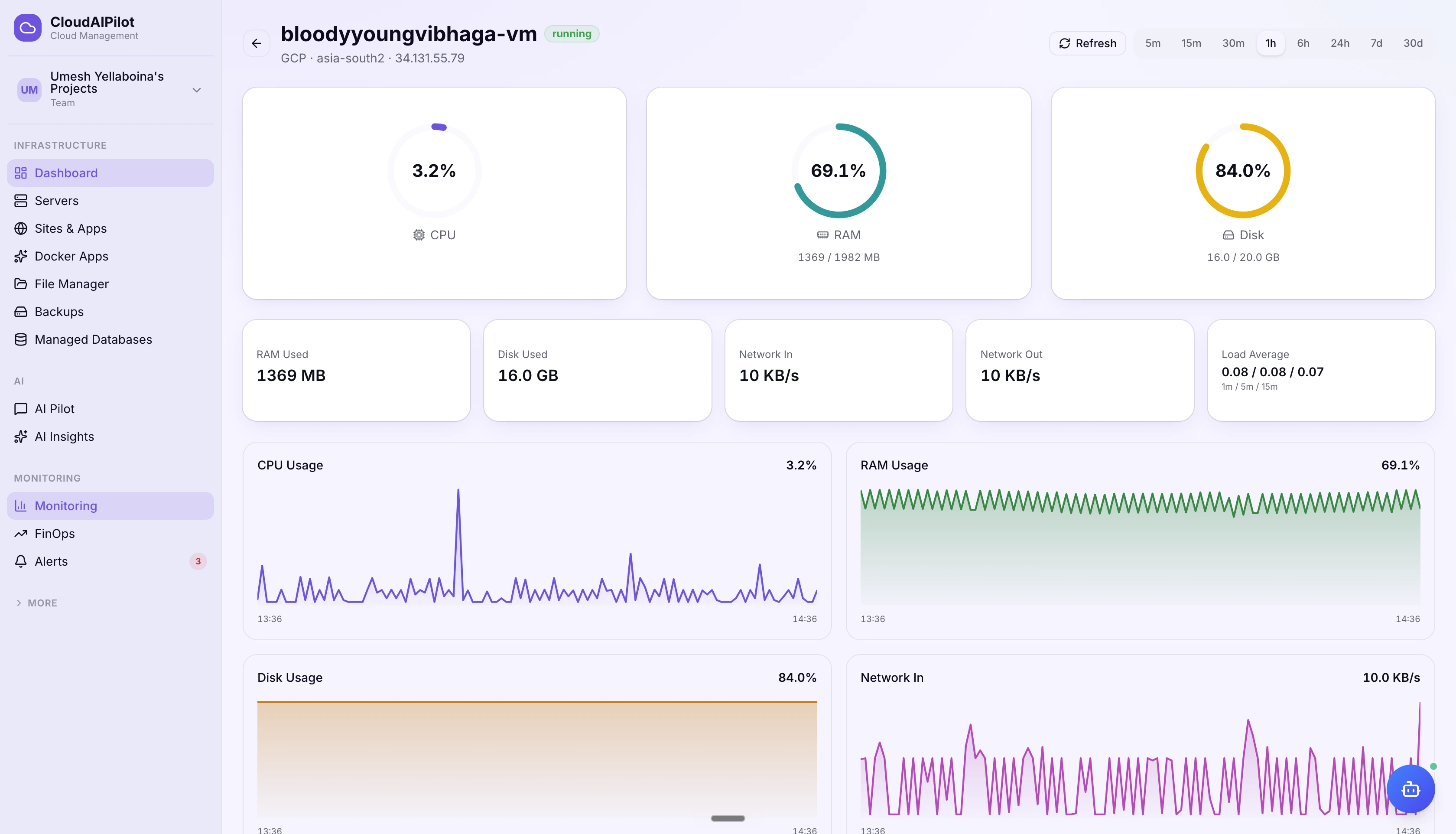
Real-time metrics streamed over WebSocket. Seven default alert rules created automatically when you provision a server. Multi-channel delivery so the right person gets the right alert, every time.
Alerts support hysteresis to prevent flapping: the condition must recover for a configurable duration before the alert clears. Escalation chains let you define who gets notified if no one acknowledges within a set window.
Full control over what's running.
Manage systemd services and scheduled jobs directly from the dashboard. No more SSHing just to restart a service or check when a cron last ran.
Quantum-safe infrastructure,
available today.
Post-quantum cryptography is no longer theoretical. CloudAIPilot ships PQC as a standard feature: activate it in one click without touching config files or rebuilding anything.
Protect against harvest-now,
decrypt-later attacks
Nation-state actors are already collecting encrypted traffic today, planning to decrypt it once quantum computers mature. PQC-protected connections are immune: the harvested ciphertext is worthless.
CloudAIPilot uses ML-KEM-768 for key exchange and ML-DSA-65 for authentication signatures. Classical fallback is always available for servers or clients that don't yet support PQC, no operational disruption.
Every cloud. Every OS.
Four major cloud providers and all major Linux distributions, all managed from one dashboard with the same consistent experience.
All server management, SSH, firewall, and AI features are available for Linux-based servers. Windows Server instances connected via cloud API are visible in the fleet with monitoring data.
"Server management done right, once, across every cloud."
Start managing your fleet today.
Connect your cloud accounts in minutes. No agents to install manually: CloudAIPilot deploys the agent automatically on first connect.
Sign up free · Connect your existing AWS, GCP, Azure or DigitalOcean account · Agent deploys automatically