Deploy any container.
Any cloud. One click.
From Docker Hub image to running production container in 30 seconds, no SSH wrestling, no YAML complexity, no ops team required.
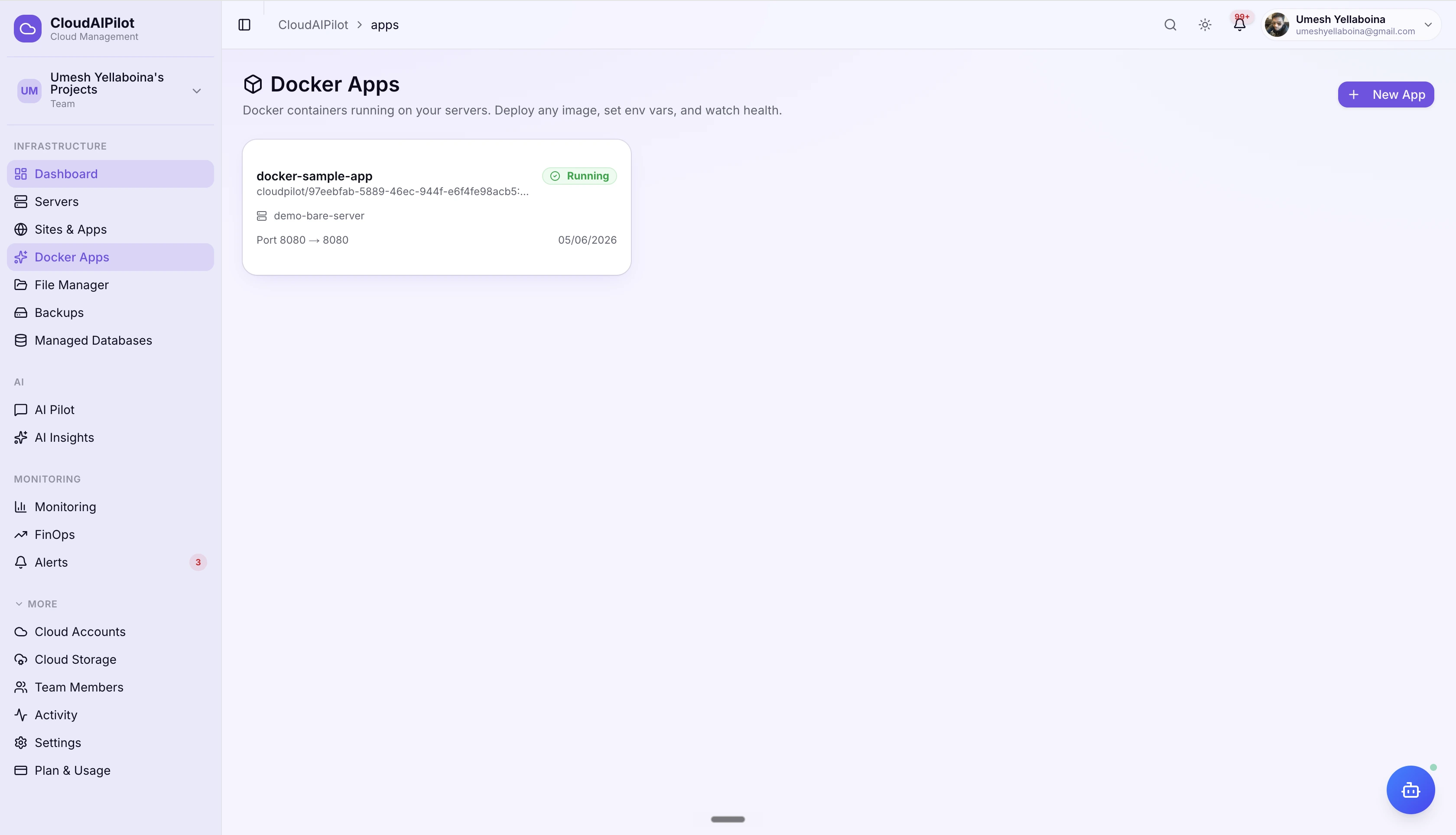
Containers without the complexity
Everything from a single Docker image to a multi-service compose stack: deployed, monitored, and managed from one dashboard across all your clouds.
Four deploy paths, zero friction
Pull any Docker Hub or registry image, build from a Git repo using your own Dockerfile, point to a docker-compose.yml in any branch, or drag-and-drop a source archive, and CloudAIPilot handles firewall setup, image builds, and health checks for all of them automatically.
Zero-downtime redeploys
Enable zero-downtime mode on any app with a custom domain. When you redeploy, the new container starts on a shadow port, health-checks quietly, then Nginx swaps traffic atomically, visitors experience zero interruption, no blue-green infrastructure required.
AI-native diagnostics
AI Insights surface performance, security, and reliability issues directly on every app's detail page. The AI agent can list your apps, suggest the best server for a new deploy, fetch logs with secret redaction, probe reachability, and roll back, all from a conversation.
Six tabs. Total control.
Every Docker app gets a dedicated detail page with six purpose-built tabs, from real-time logs to one-click rollback to zero-downtime configuration.
Overview
Status badge, server info, port mappings, health path, and last deployed time at a glance. Redeploy any image with one click: type a new tag or leave blank to reuse the current one. Git-sourced apps show a commit picker to deploy any specific commit.
Deployments
Full deployment history with image ref, commit SHA, deployment date, and expandable build log for every run. Each succeeded deployment shows a Roll back to this version button: one click re-deploys that exact image or local build tag.
Environment
Add, edit, and manage encrypted environment variables with individual key-value rows. Use the Paste .env button to bulk-import an entire .env file: comments stripped, duplicate keys resolved, existing rows preserved.
Logs
Fetch the last 300 lines of docker logs output with a single click. Works for both single containers and Compose stacks. Copy the full output to clipboard for sharing with your team or pasting into AI.
Domains
Add custom domains with DNS setup guidance (server IP shown, one-click copy). CloudAIPilot provisions a Let's Encrypt certificate automatically. Compose stacks can route different domains to different published ports or named services.
Settings
View runtime config: image ref, restart policy, health path, CPU and memory limits, and all mapped ports. Toggle zero-downtime deploys (requires a custom domain). One-click delete with a type-to-confirm dialog and a cleanup summary of what was removed.
Multi-service stacks, first-class
Run your entire application (API, worker, proxy, cache) as a coordinated Compose stack. Paste YAML inline or point to a docker-compose.yml in any Git branch. CloudAIPilot handles the rest.
Inline YAML or from Git
Paste your docker-compose.yml into a Monaco editor with syntax highlighting, or connect a Git account and point to any file path in any branch, including docker-compose.prod.yml or subdirectory files.
Multi-port publishing
Declare each host port you want exposed: CloudAIPilot opens them all on UFW and your cloud provider's firewall simultaneously. Each port is conflict-checked before deploy.
CPU & memory limits
Set optional CPU (cores) and memory (MB) caps: written as a docker-compose.override.yml so your original file stays untouched. Prevents a runaway service from starving the host.
Bad deploy? Back in seconds.
Every succeeded deployment is saved: image reference for Docker Hub pulls, or a local image tag on your server for Git and upload builds. Roll back to any prior version with one click. No re-cloning, no rebuilding.
Rollback works by redeploying the saved reference: registry images are re-pulled, Git/upload builds use the image tag already on the server. The Activity Center shows live step progress either way.
Your domain. Auto-SSL included.
Add any custom domain to a Docker app, point your DNS A record to the server IP (shown right in the UI), and CloudAIPilot provisions a Let's Encrypt certificate automatically. The UI polls until SSL is active, no manual certbot commands.
Auto Let's Encrypt
SSL provisioning is one click. The tab polls every 5 seconds while the cert is pending and updates to "SSL active" once it's issued, typically under 60 seconds.
Per-service routing for Compose
Compose stacks can bind multiple domains to different published ports or service names: route api.example.com to port 3000 and www.example.com to port 80, each with its own SSL cert.
Expiry tracking
Each domain shows its SSL expiry date. Upcoming renewals surface before they expire, so you're never surprised by a lapsed certificate on a production app.
Your AI knows your containers
AI Insights surface actionable issues directly on every app. The AI agent can deploy, diagnose, roll back, and verify reachability, all from a single conversation.
AI Insights tile
Every app detail page shows an AI Insights tile: up to 5 active insights covering performance, security, cost, and reliability, each with a severity badge. One click sends the insight straight to the AI chat with full server context pre-loaded.
AI agent tools
The AI agent has purpose-built tools for Docker Apps. Ask it to deploy a new version, check why a container is failing, suggest the best server for a workload, or verify the app is reachable after a deploy, no copy-pasting commands.
Alerts wherever your team lives
Get notified on every deploy success, failure, or crash, on any channel your team already uses. Each notification includes the app name, server, deploy status, and a direct link to the detail page.
Notification channels are configured once per organisation in Settings → Notifications and apply to all apps, servers, sites, and backups. Members can set personal notification preferences independently of org defaults.
Every cloud. Every major Linux distro.
Run Docker Apps on any connected Linux server, provisioned through CloudAIPilot or imported. All four major cloud providers supported, with automatic firewall management per provider.
Docker Apps run on any connected Linux server. RHEL/CentOS variants are also supported for imported servers.
Every deploy, fully visible
CloudAIPilot opens the firewall, clones your repo on the target server, builds the image there, health-checks the new container, and confirms it's serving traffic, each step tracked in the Activity Center in real time. No black-box deploys.
Firewall automation
UFW and cloud security group rules opened automatically for every declared port: AWS SG, GCP Firewall Rules, Azure NSG, or DO Cloud Firewall.
Builds on your server
For Git and upload sources, the Docker build runs on your server: your code never touches our infrastructure. Images stay where your data belongs.
Health-check verified
Deployment only completes when the container passes the configured HTTP health path: failed health checks surface as a deploy failure, not a silent issue.
From image to production.
In 30 seconds.
Deploy your first Docker container free, no credit card, no infrastructure setup, no ops team required.
Free tier includes 3 Docker apps · No credit card required