Every server backed up.
Automatically. Encrypted. Offsite.
Cloud snapshots, database dumps, and file archives: scheduled, encrypted with a per-backup key, and uploaded offsite automatically. Restore with a safety net or cancel mid-way.
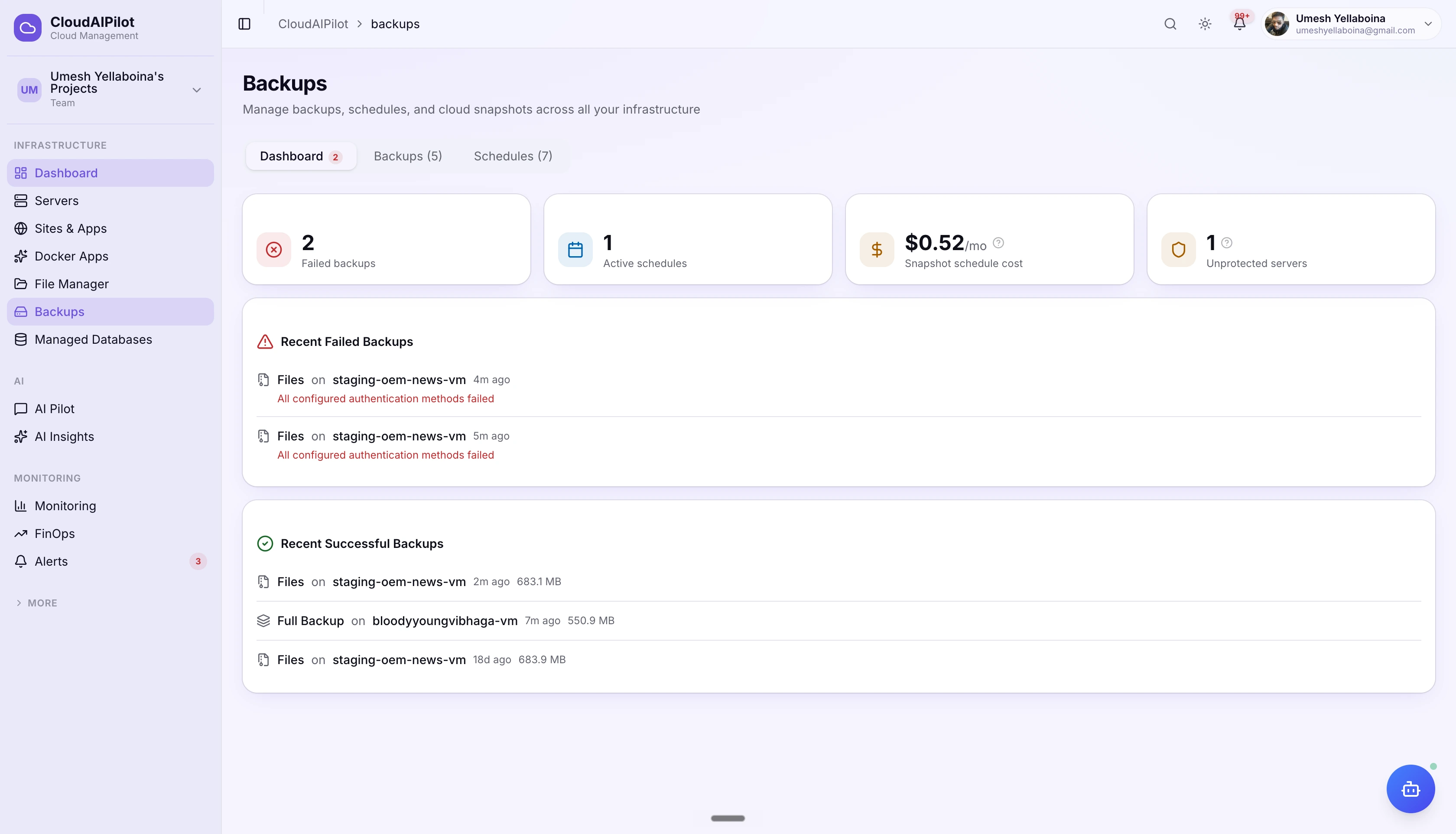
Protection built into the platform.
Not a separate tool, not a third-party add-on. Backups live alongside your servers, sites, and databases: scheduled, monitored, and restorable from the same dashboard.
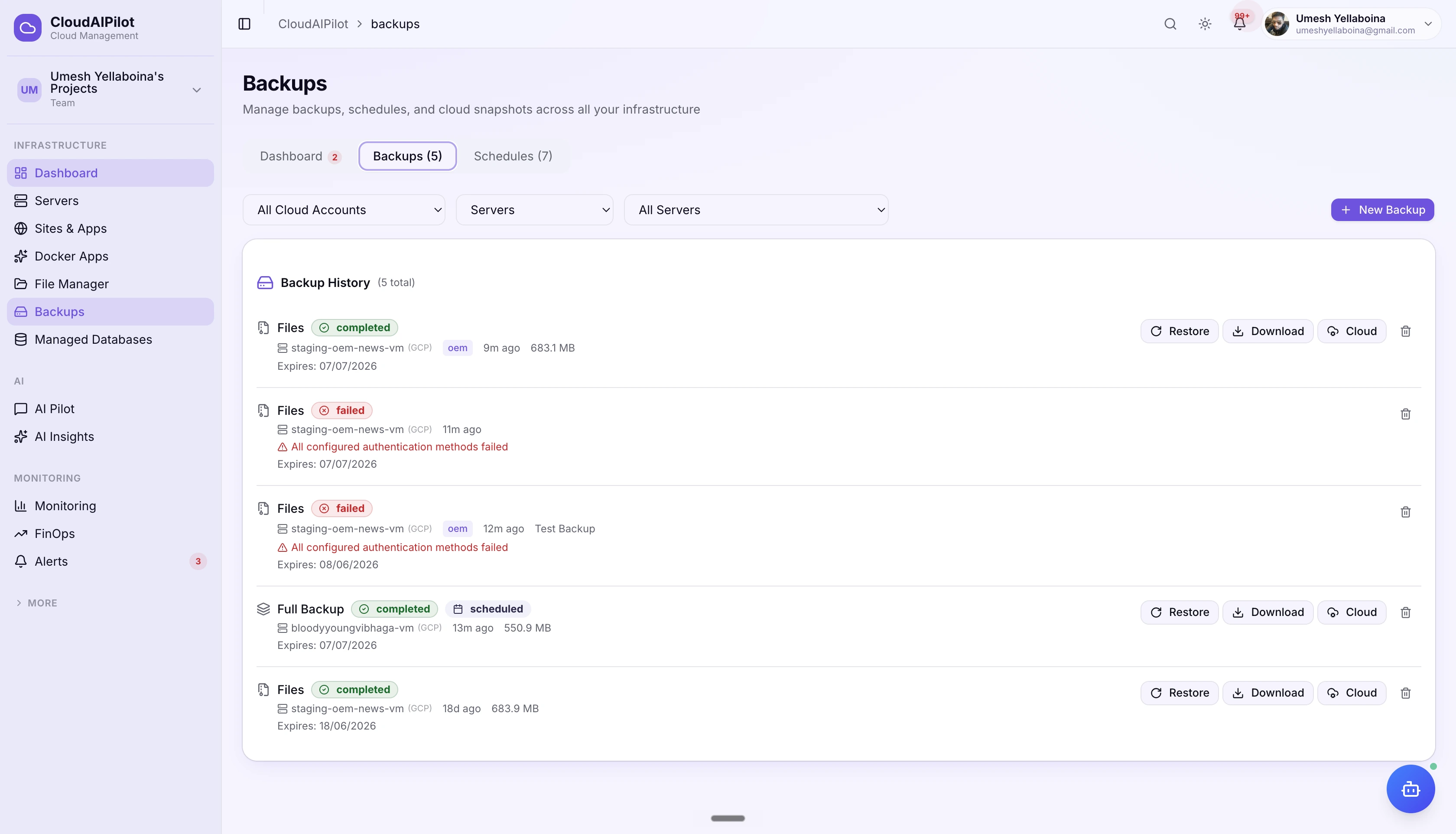
4 backup types in one place
Cloud snapshots, database dumps, file archives, or all three in a single Full backup run. One schedule, one retention policy, one dashboard covering every server in your fleet.
Offsite storage + encryption
Upload completed backups to S3, GCS, Azure Blob, or DO Spaces automatically on completion. AES-256-CBC encryption with a per-backup key: you download a clean, decrypted archive.
Restore with a safety net
Safe Mode snapshots your current state before touching anything, then auto-rollbacks if the restore fails. Cancel mid-restore at any step. Partial restore: database only, files only, or specific site.
Every layer of your stack. Protected.
From the full disk to individual databases and file archives: pick the right backup type for each server or combine all three in a single Full backup.
Cloud Snapshot
Full disk snapshot taken via cloud provider API: atomic, consistent, and platform-managed. No SSH overhead, no bandwidth cost. The provider handles capture, storage, and native encryption.
- Full disk snapshot: atomic and crash-consistent
- Provider-encrypted by default (no extra config)
- Billed by cloud provider per GB stored per month
- Snapshot name stored: reference for cloud console restore
- Monthly cost estimate shown in dashboard
Database
MySQL, MariaDB, and PostgreSQL dumps executed via SSH using mysqldump or pg_dump, piped to gzip. Back up all user databases at once or target a specific site's database.
- All user databases or per-site targeting
- System databases excluded automatically
- Compressed to gzip on the fly over SSH
- Optional AES-256-CBC encryption per backup
- Downloadable .sql.gz from the dashboard
Files
Compressed tar.gz archive of site document roots via SSH. Incremental option: use --newer-mtime to only archive files changed since the last completed backup, keeping archive sizes small.
- Full or incremental archives (modified files only)
- Targets site document roots automatically
- Per-site or full-server scope
- Optional AES-256-CBC encryption
- Single-file download or full archive from dashboard
Full Backup
Cloud snapshot + database dumps + file archives in a single scheduled run. Maximum coverage in one operation, ideal for servers running both databases and web applications.
- All three backup types combined in one job
- Single retention policy covers all components
- Offsite upload covers the full backup set
- Best for complete disaster recovery coverage
- Monthly cost estimate includes snapshot component
Set it. Forget it.
Sleep better.
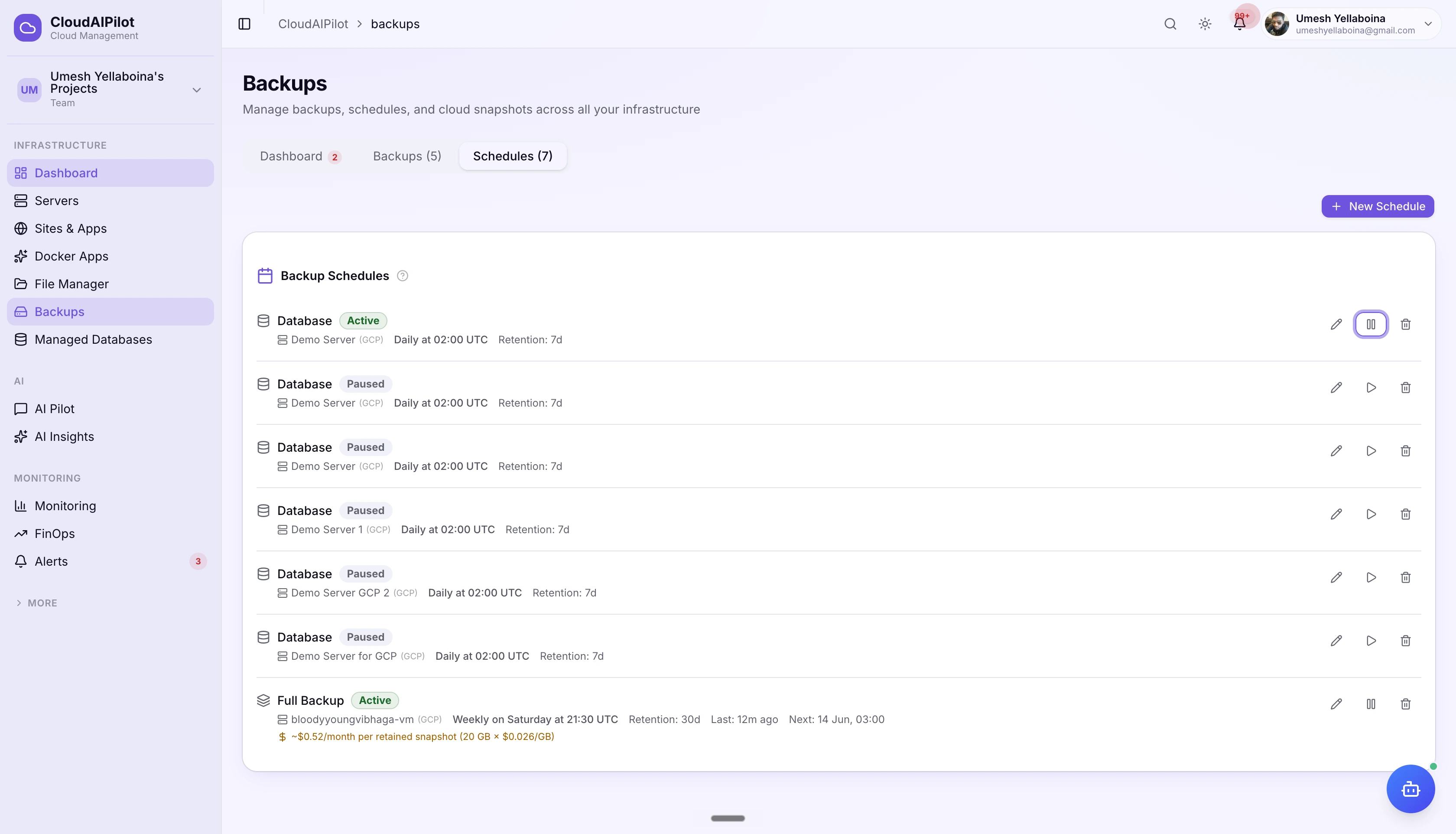
Create a schedule with a cron preset or custom expression. Set retention from 1 to 365 days, backups auto-delete after expiry. Enable incremental file archives to keep sizes down. Pause any schedule without losing its configuration.
Cron presets + custom expressions
Every 6 hours, 12 hours, Daily, Weekly, Monthly, or type your own 5-field cron. Displayed in human-readable form: "Daily at 02:00 UTC". Next run shown per schedule.
Retention 1 to 365 days, auto-expiry
Backups are automatically deleted after their retention period. No manual housekeeping. Set 7 days for frequent snapshots, 90 days for monthly archives, your call.
Incremental file backups
Enable incremental on any files schedule and CloudAIPilot only archives files modified since the last completed backup, using --newer-mtime. Full backups stay small and fast.
Pause / resume schedules
Suspend any schedule without deleting it: maintenance windows, migrations, cost control. Resume when ready. Active/Paused badge shown per schedule in the dashboard.
Your backups live on a
separate cloud account.
Auto-upload every completed backup to your cloud storage vault: a separate cloud account from your servers. AES-256-CBC encrypted with a unique key per backup. Download a clean, decrypted archive directly from the dashboard.
Auto-upload on completion
Enable offsite on any schedule and every completed backup streams straight to your vault: S3, GCS, Azure Blob, or DO Spaces. No manual steps, no scripts. Upload tracked alongside the backup job.
AES-256-CBC per-backup encryption
Each backup gets its own Data Encryption Key, PBKDF2-hardened at 100,000 iterations. Key stored encrypted in backup metadata. Decrypted server-side when you download, you always get a clean archive.
Download full archive or single file
Download the entire .tar.gz from the dashboard, or use ?file={path} to pull a single file out of the backup. No SFTP client, no AWS console.
Cloud snapshots are not encrypted by CloudAIPilot, cloud providers (GCP, AWS, Azure, DigitalOcean) handle snapshot encryption natively.
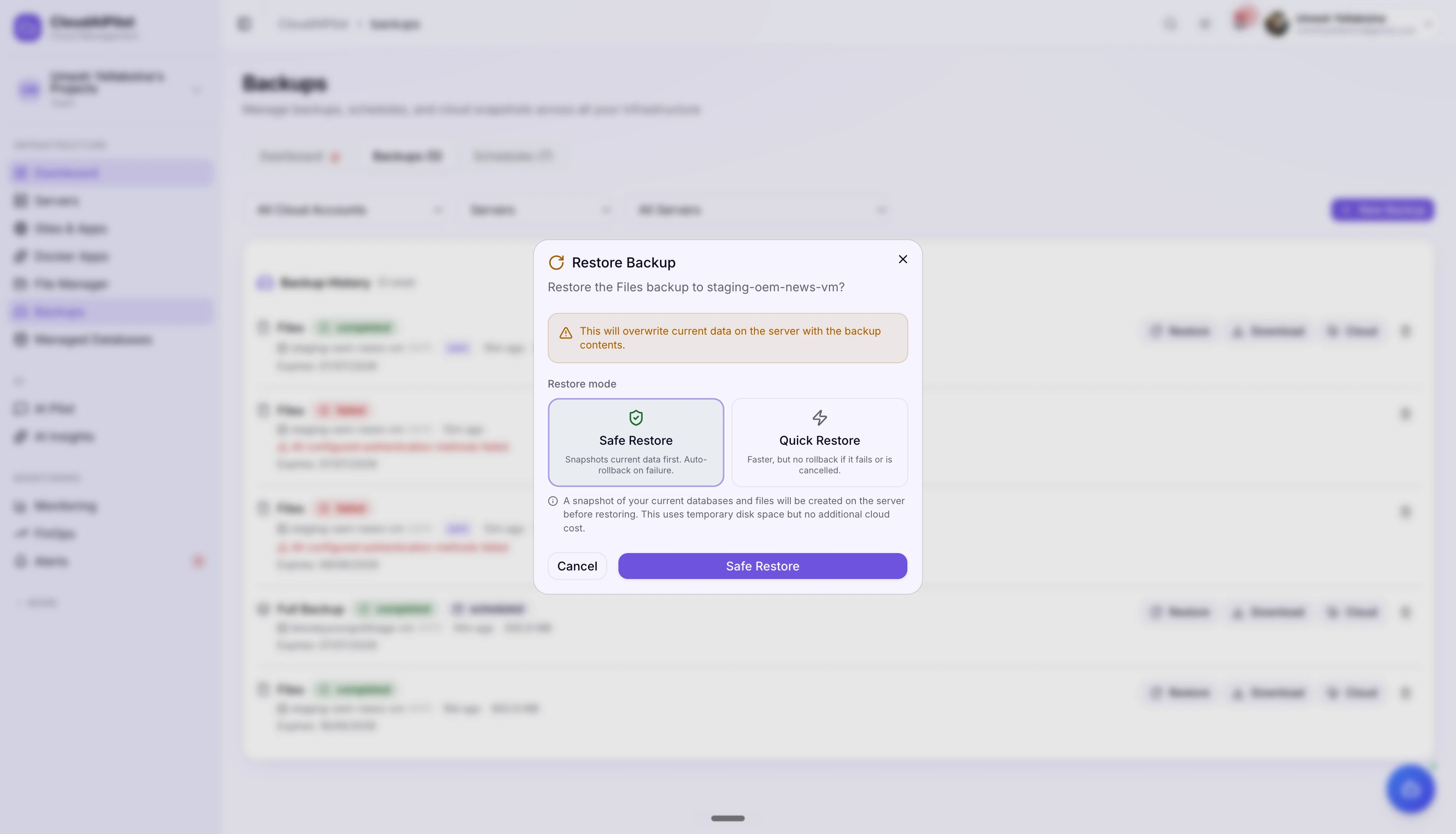
Restore with a safety net.
Cancel if you change your mind.
Two restore modes. Safe Mode snapshots your current state first and auto-rollbacks on failure. Quick Mode skips the safety snapshot for speed. Cancel mid-restore: CloudAIPilot checks for a cancel signal between every step.
Safe Mode Default
Safety snapshot of current state before restore. Auto-rollback if anything fails mid-way. Production-safe.
Quick Mode Faster
No safety snapshot. Faster and needs less disk. No rollback if restore fails mid-way.
Live WebSocket progress
Step-by-step restore status streams in real time: Connecting → Disk check → Safety snapshot → Restore data → Complete. Cancel button active throughout, writes a cancel signal the script checks between each step.
Partial restore
Restore only the database, only the files, or a specific site from a Full backup, no full-server restore required. Per-database targeting supported.
All four major clouds. All four backup types.
Cloud snapshots work across every provider CloudAIPilot supports. Database and file backups run on any server regardless of provider.
Snapshot storage estimate
EBS snapshot storage estimate
Managed disk snapshot estimate
Droplet snapshot estimate
Snapshot pricing estimates based on publicly available provider rates. Actual cost depends on disk size and region. CloudAIPilot shows estimated monthly cost per schedule in the dashboard.
Ask the agent to back up or restore.
The CloudAIPilot AI agent has three backup tools built in: create, restore, and download. Restore always requires explicit approval. No destructive actions without your sign-off.
Trigger a manual backup for any server or site. In autonomous agent mode, executes immediately without interrupting the plan, low-risk operation.
Restore a server from a backup. Always requires explicit user approval, this is a destructive operation. Defaults to Safe Mode with auto-rollback enabled.
Download an offsite-stored backup back to the server before restoring. Only works when the backup has been uploaded to a cloud vault. Approval required.
Every server. Backed up.
Restorable in minutes.
Schedule once, encrypt automatically, restore with confidence. CloudAIPilot handles the rest.
No credit card required · Cancel any time